01 / Problem
Show status and controls without covering the game.
A mobile action interface needs enough information and input surface to support play while preserving awareness of enemies, platforms, and movement space.
HUD / Controls / Feedback
A touch-first gameplay interface study that distributes health, score, level, pause, movement, and actions around an active playfield.
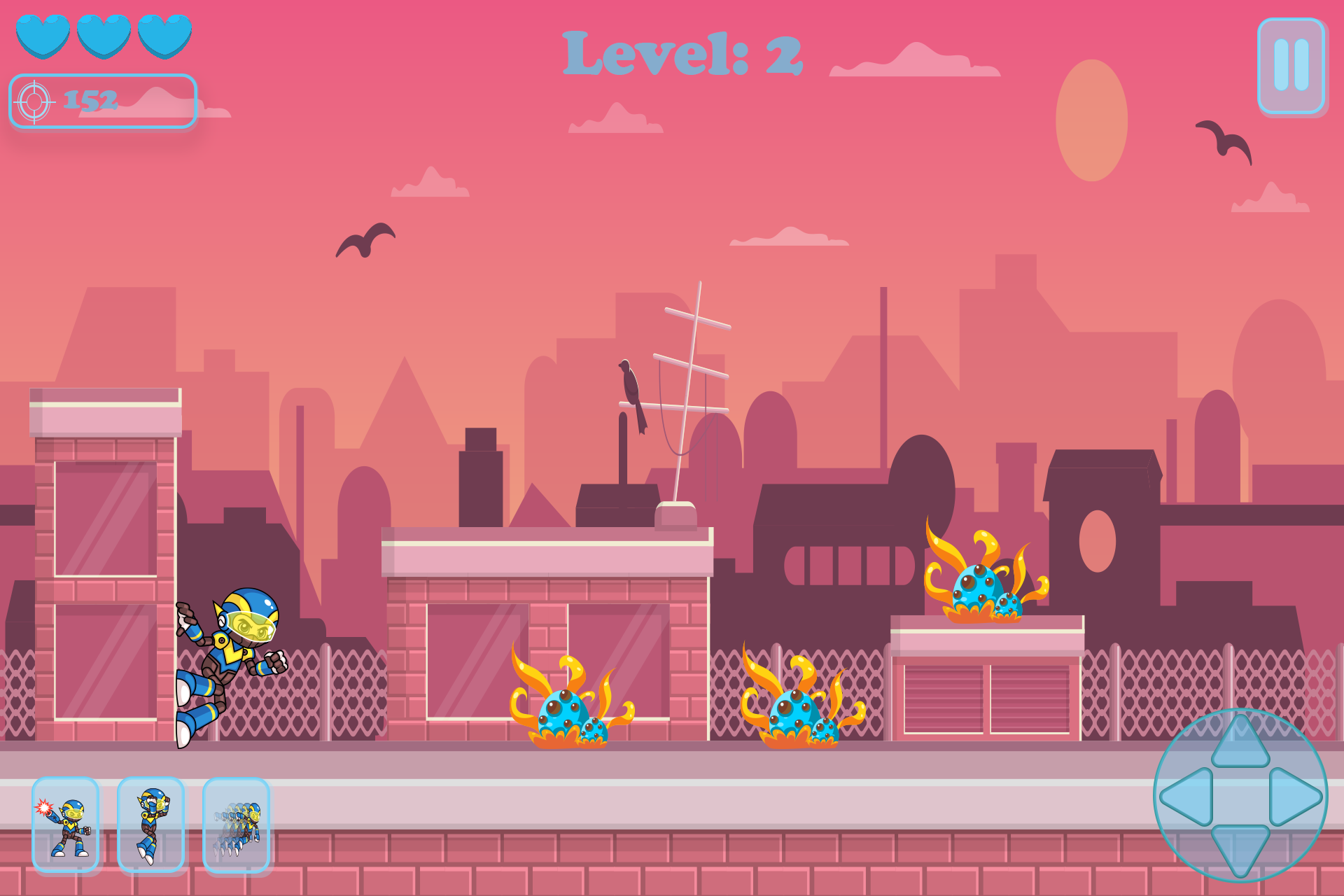
The design at a glance
Persistent information stays near the top edge. Movement and ability controls occupy opposite lower corners, leaving the center open for character movement and threats.
This is a static composition study. It is not presented as a working or usability-tested gameplay prototype.
01 / Problem
A mobile action interface needs enough information and input surface to support play while preserving awareness of enemies, platforms, and movement space.
02 / Design intent
The top communicates status and session state. The lower-left holds actions, and the lower-right holds directional movement.
03 / Key decisions
04 / Interaction & usability
A working version should validate reach, safe areas, handedness, opacity, active states, haptics, and contrast as the scene changes behind the HUD.
05 / Tools & skills
HUD composition, control mapping, player feedback, action grouping, touch affordances, visual hierarchy, and gameplay-centered interaction thinking.
06 / What I’d improve next
My gameplay work helps me treat the HUD as part of the control loop: input, animation, system response, visual feedback, and player understanding should reinforce one another.
Next level / Let’s work together